Help & FAQ
Do I need a paid subscription to download spreadsheets?
No. You only need a valid CrewPay account to access these files.
How do I create an account?
At the current time as I'm busy building up the iPad app and streamlining the account creation process, new accounts must be created within the CrewPay iPad app. No purchase is necessary to create an account. You will need a valid @wnco.com work email address and matching employee number to verify your employment status. Once your account is created you can use the same credentials to log in here on the website to access the spreadsheets.
What does the spreadsheet do?
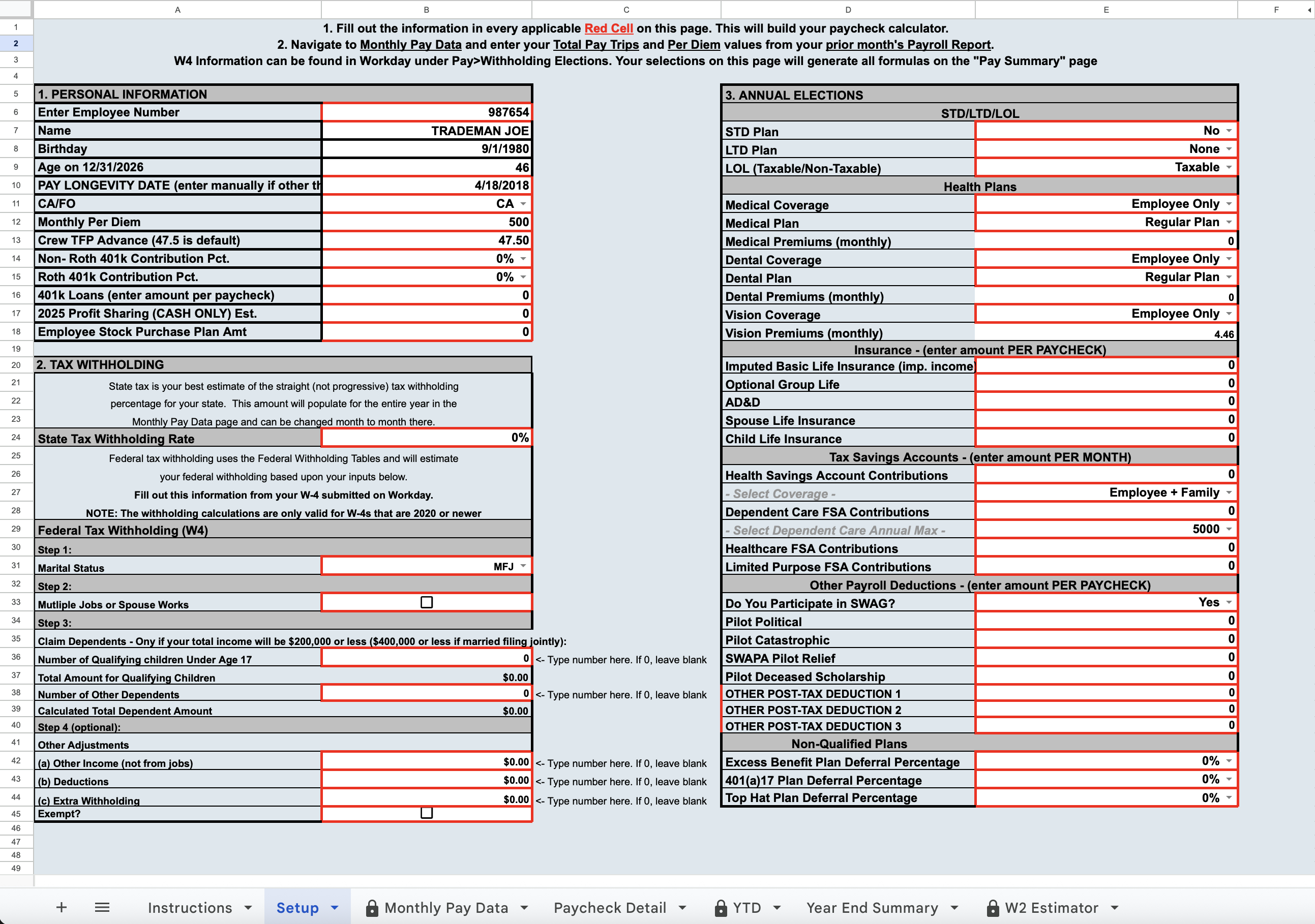
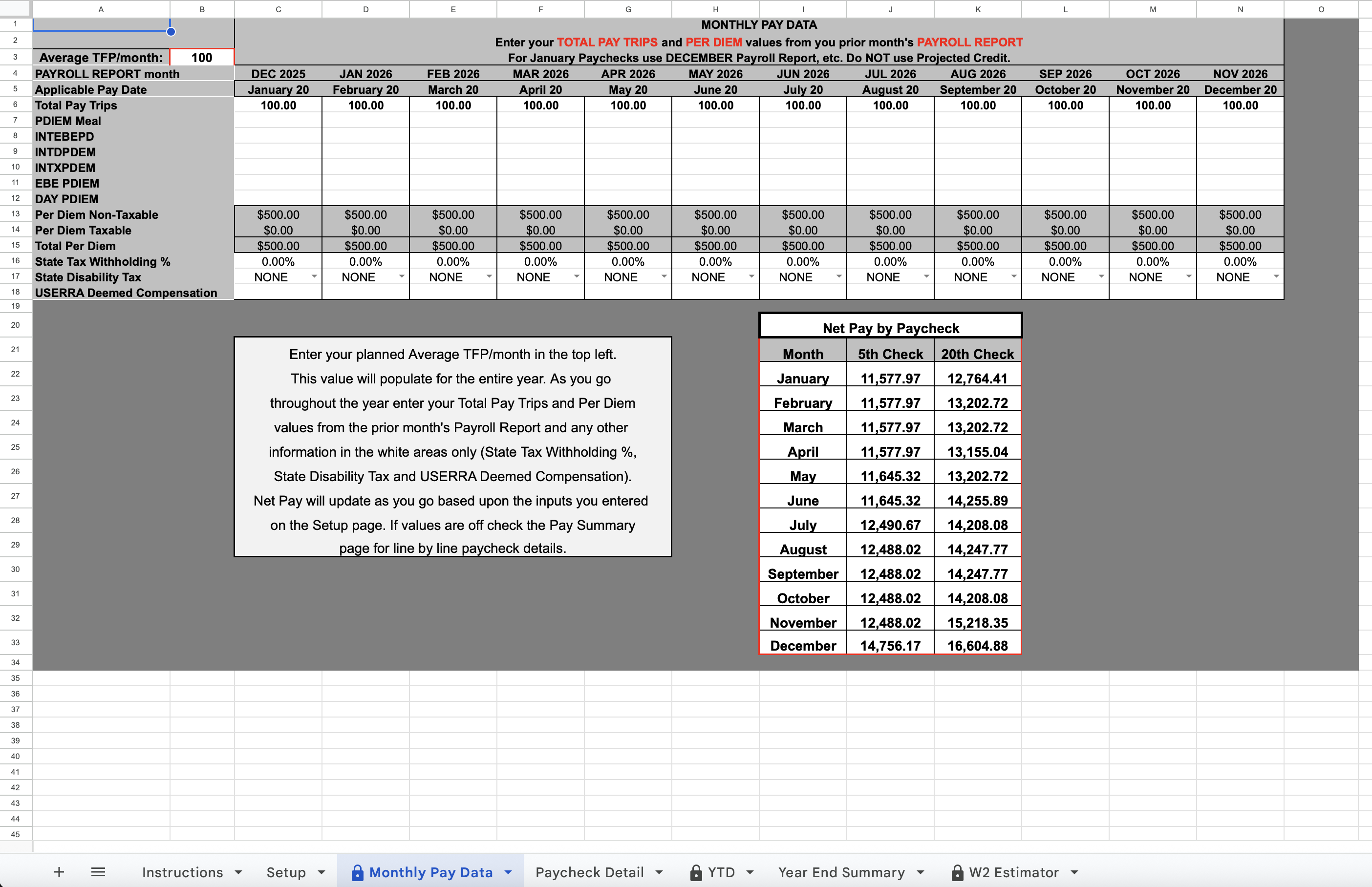
CrewPay Calculator (iPad app and Spreadsheet) attempts to calculate your paychecks as accurately as possible. By setting up your pay structure with all your relevant information (401k, insurance, CA/FO, longevity date, HSA/FSA plans, etc.) the calculator can give you precise paycheck estimates. It automatically pre-loads your TFP rate for every paycheck and calculates taxes, deductions, retirement and any excesses or limits based upon the monthly TFP data you input.
Does this work for everyone?
Not 100% all the time. If you are on disability, leave of absence, extended military leave, or have any other special pay situation this may not work for you. If you have extreme amounts of deductions (super high 401k, Top Hat, Excess Benefit, etc.) it may not calculate correctly. The calculator does not account for negative paychecks where deductions exceed gross pay. In these situations the Company will cap deductions at some point and issue a $0 paycheck. Additionally, if your state has unique tax codes that are not accounted for in the calculator your results may be off. This calculator is meant to work for the vast majority of line pilots doing typical line flying under the standard SWA pay structure.
Will the numbers be exact?
If your setup is correct and you enter your monthly TFP and Per Diem data accurately, most numbers should be exact or within a few pennies/dollars, including your Federal Income Tax withholding. However, with over 11,000 different pilots and scenarios there are going to be some cases that do not calculate correctly. State income tax is the only value on the Paycheck Detail page that does not have a precise calculation to it due to the complexity of state tax codes. The state income tax withholding is a percentage estimate that you input that should get you close to the actual amount withheld.
What do I need to update each month?
Most pilots in most months will only need to enter their Total Pay Trips and Per Diem totals from the bottom of your Payroll Report. Always use the Payroll Report for the month prior to that specific 20th Paycheck it applies to. For example, for the June 20th paycheck you will use the data from May's Payroll Report on CWA.
Which annual limits are taken into account?
All annual limits should be accounted for. This includes OASDI, NEC, 401k, MBCBP, Employee Stock Purchase, HSA, FSA limits. The 401k limits adjust automatically based on your age. If you will be 50 or older by the end of the calendar year, you are eligible for catch-up contributions. The catch-up contributions are Roth Only in 2026. These limits are all already accounted for.
My net pay is normally very accurate but this paycheck it was off by some. Do you know why?
There are a variety of reasons your Net Pay could be different for just one paycheck. Imputed income is an often overlooked item because even though it is not a deduction of wages it can affect the taxes withheld. Other reasons would be one-off payments from the Company that are not on your payroll report (Error Pay, Grievance Settlements, etc.). If any of your prior entries were incorrect it could affect future paychecks as far as annual limits go.
How was CrewPay Calculator developed?
CrewPay is a result of several years of reverse engineering my own personal paychecks to try to come up with a reliable calculator for all pilots to use. With the help of other pilots sending me their specific scenarios I have tried to incorporate as many options as possible to make this a useful tool for as many pilots as I can. If you notice any mathematical errors or have your own unique scenario that is not accounted for please contact me so I can try to improve the calculator for everyone.